Workflow Automation for Global HR Operations

Workflow Automation for Global HR Operations

Remote's customers managed 1000+ employees across 80+ countries. HR teams needed to automate repetitive tasks—onboarding reminders, offboarding checklists, compliance notifications—but existing tools felt "built by engineers, for engineers."

Remote's customers managed 1000+ employees across 80+ countries. HR teams needed to automate repetitive tasks—onboarding reminders, offboarding checklists, compliance notifications—but existing tools felt "built by engineers, for engineers."

Problem

HR teams drowning in manual coordination across 80+ countries. Existing tools felt "built by engineers, for engineers."

Solution

No-code workflow builder that hides technical complexity behind calendar-relative language.

Impact

Beta launched July 2024. Expanded from 1 use case to 10+ trigger types in 2 months. Customer Advisory Board: 15 out of 15 customers said they'd use it.

Problem

HR teams drowning in manual coordination across 80+ countries. Existing tools felt "built by engineers, for engineers."

Solution

No-code workflow builder that hides technical complexity behind calendar-relative language.

Impact

Beta launched July 2024. Expanded from 1 use case to 10+ trigger types in 2 months. Customer Advisory Board: 15 out of 15 customers said they'd use it.

The Manual Coordination Problem

The Manual Coordination Problem

Remote's customers manage global teams every day, and their HR staff manually:

  • Set reminders for upcoming employee milestones

  • Track contract renewals and important dates

  • Post status updates across communication channels

  • Route approvals through complex conditional rules

"Rippling's workflow builder feels like it was built by engineers for engineers. We'd prefer less customization in favor of ease of use."


Very Good Ventures (100+ employees)

Core challenge: How do you automate complex conditional logic without exposing users to if/then statements?

From 15 Customer Interviews to Core Architecture

From 15 Customer Interviews to Core Architecture

Concept validation

Presented workflow automation concept to 15 board customers—all said they'd use it. Cross-functional teams identified integration needs.

Research & Design

Conducted customer interviews (Nabu Casa, Very Good Ventures). Analyzed competitors (Zapier, Rippling). Explored early design directions and information architecture.

Development & Prototyping

Engineering built core workflow builder. Design created natural language AI prototype to validate architecture.

Beta Launch

Single use case shipped to all customers.

The Translation Problem

The Translation Problem

Existing tools exposed technical database events. HR teams had to think like engineers.

What users naturally say:

"Send reminder to manager 5 days before employee start date"

What systems actually need:

When employee.status changes to active, schedule email to manager_id with -5 day offset from start_date timestamp

Our approach:

Users select "Employee Start Date" from a dropdown, choose "5 days before" from timing options. They never see database field names or event triggers. This translation layer between human language and system events became the foundation of our architecture.
Progressive Disclosure at Scale

Progressive Disclosure at Scale

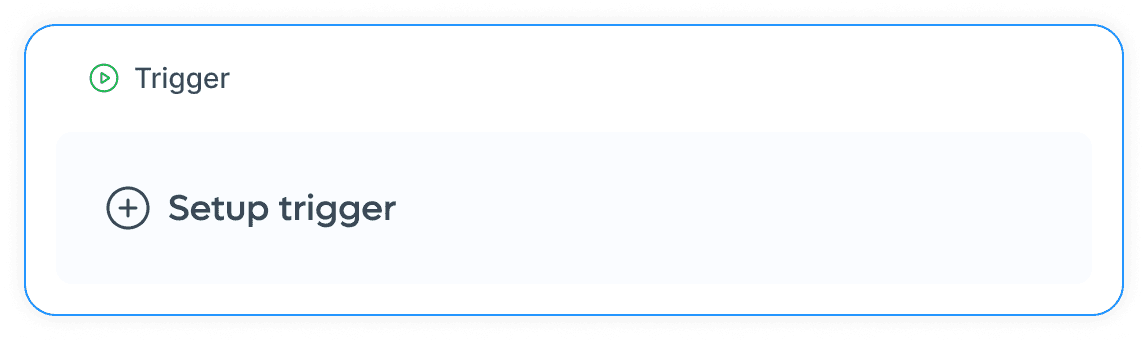
Step 1: Clean slate

Only "Setup trigger" visible. Nothing else competing for attention.
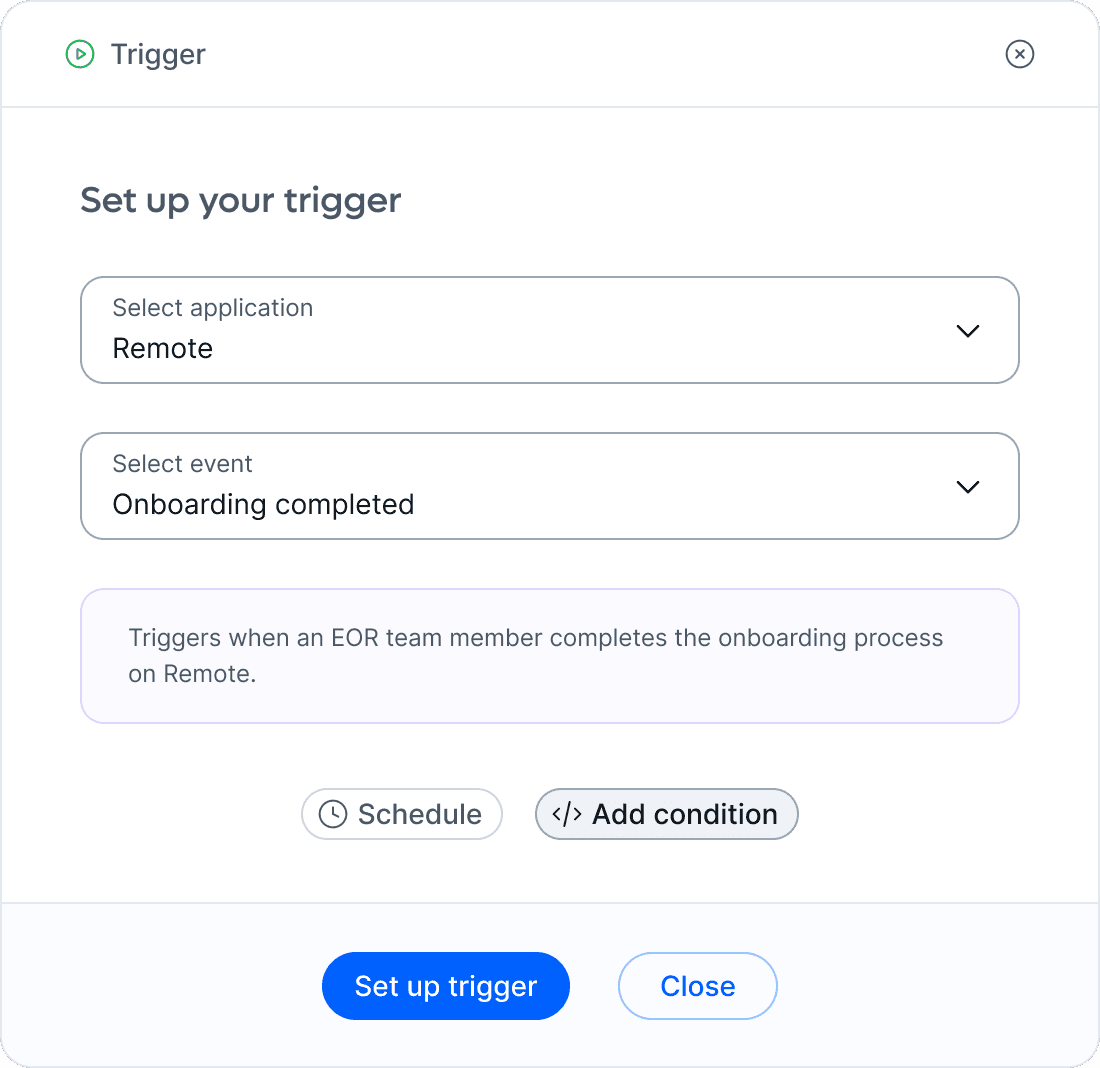
Step 2: Contextual expansion

After trigger is set, "Schedule" and "Add condition" appear. User knows what to do because there are only 2 options.
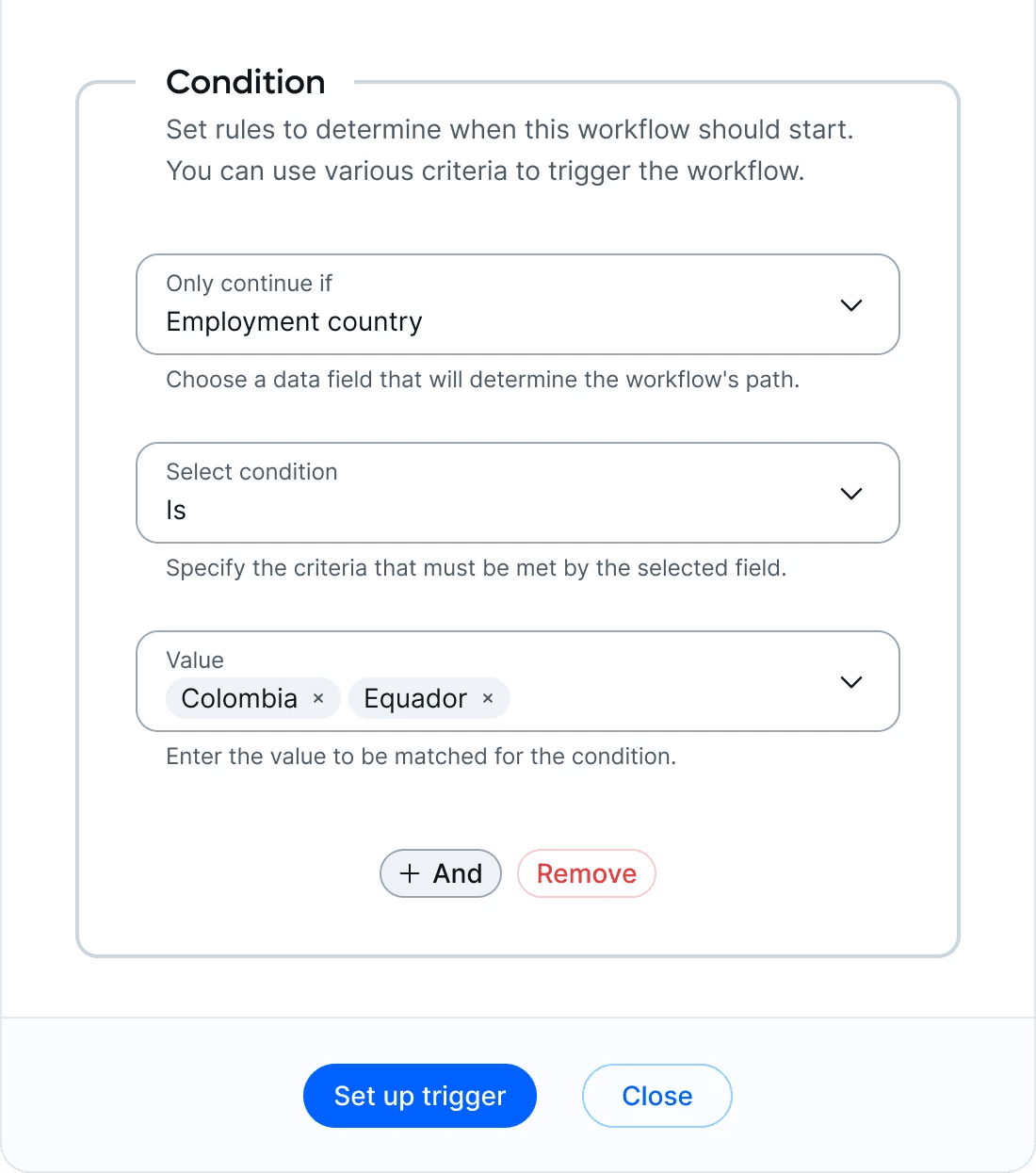
Step 3: Reveal complexity gradually

Card expands showing real filters: "Employment country = Colombia". Operator dropdown. Value field. "+ And" button to add more rules.

Result

We supported workflows with 5+ nested conditions—Zapier-level technical complexity—without scaring non-technical users. Interface scaled from simplicity ("post to Slack when someone requests time off") to real customer scenarios ("notify manager 5 days before start date, but only if country = Colombia AND contract type = Full-time AND department ≠ Engineering").

How the System Works

How the System Works

Trigger

When it happens

• Start date

• End date

• Status change

Schedule

Timing

• On event

• 5d before

• 30d after

Condition

Filters

• Country = Colombia

• Multiple conditions (AND only)

Action

What happens next

• Send email

• Post to Slack

• Create notification

Uses dynamic data:

{employee_name}

{manager_email}

Smart Fields

Dynamic data

Slack channels

• {employee_name}

• {manager_email}
• {start_date}

• {contract_type}

System fetches real data at runtime

API States

How integrations work

Slack channels

• Loading → Skeleton

• Ready → Dropdown

• Error → Reconnect

Edge case

New channel not found?
→ Manual input option

Trigger Happens

Employee data changes in database

What if Needed

Schedule system:

• Run now

• Wait 5 days

• Retry if fails

Check Rules

Evaluate conditions:

Match filters (Country, etc)

Execute Action

1. Get real data

• {manager_email} → john@company.com

2. Send action

• Post to Slack

• Send email

3. Handle errors

• Retry 3 times if fails

• Log for review

Slack

Posts message to channel

Email Service

Sends email

Database

Fetches user data
Design System Contributions

Design System Contributions

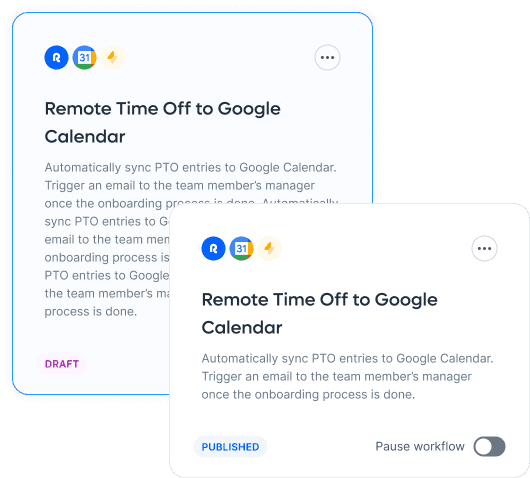
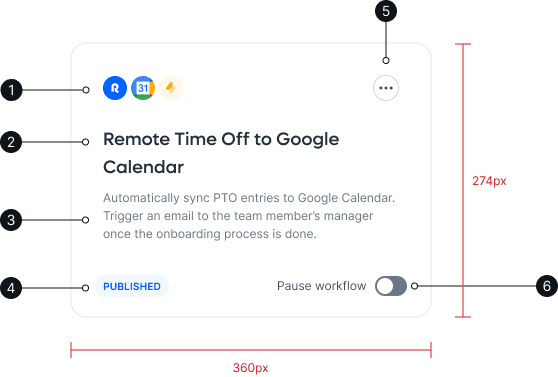
Expandable Cards System

  • Three states: collapsed → partial → fully expanded

  • Users control information density based on their needs

  • Prevents overwhelming interface while supporting complex workflows
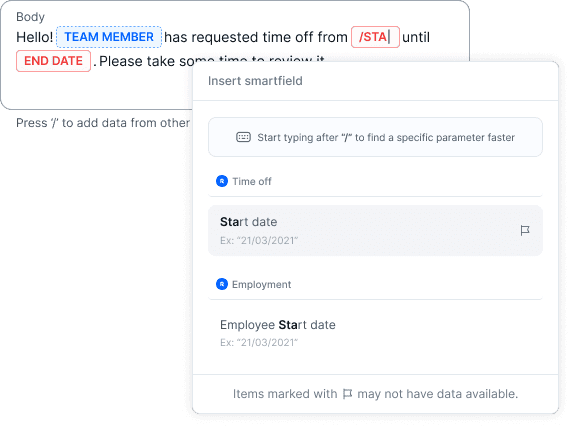
Smart Field Pills

  • Solid pill: Data available and populated

  • Dashed pill: Optional field, may be empty

  • Error pill: Required data missing or invalid
Reusable Patterns

Expandable card anatomy, smart field input component, nested fieldset structure for AND logic, and condition operator formatting—all adopted across Remote's product.

Testing the Future with AI

Testing the Future with AI

Why test with AI?

We needed to validate whether our Trigger/Schedule/Condition/Action architecture could handle real-world complexity. Since AI-powered workflow creation was already on the future roadmap, this was an opportunity to test AI capabilities early—while the manual builder was still in development.

Building the Workflow Generation Protocol

I reverse-engineered the experience into a technical specification—a Workflow Generation Protocol that translated natural language into executable rules. This defined exactly how user inputs map to database structures, API calls, and system constraints.
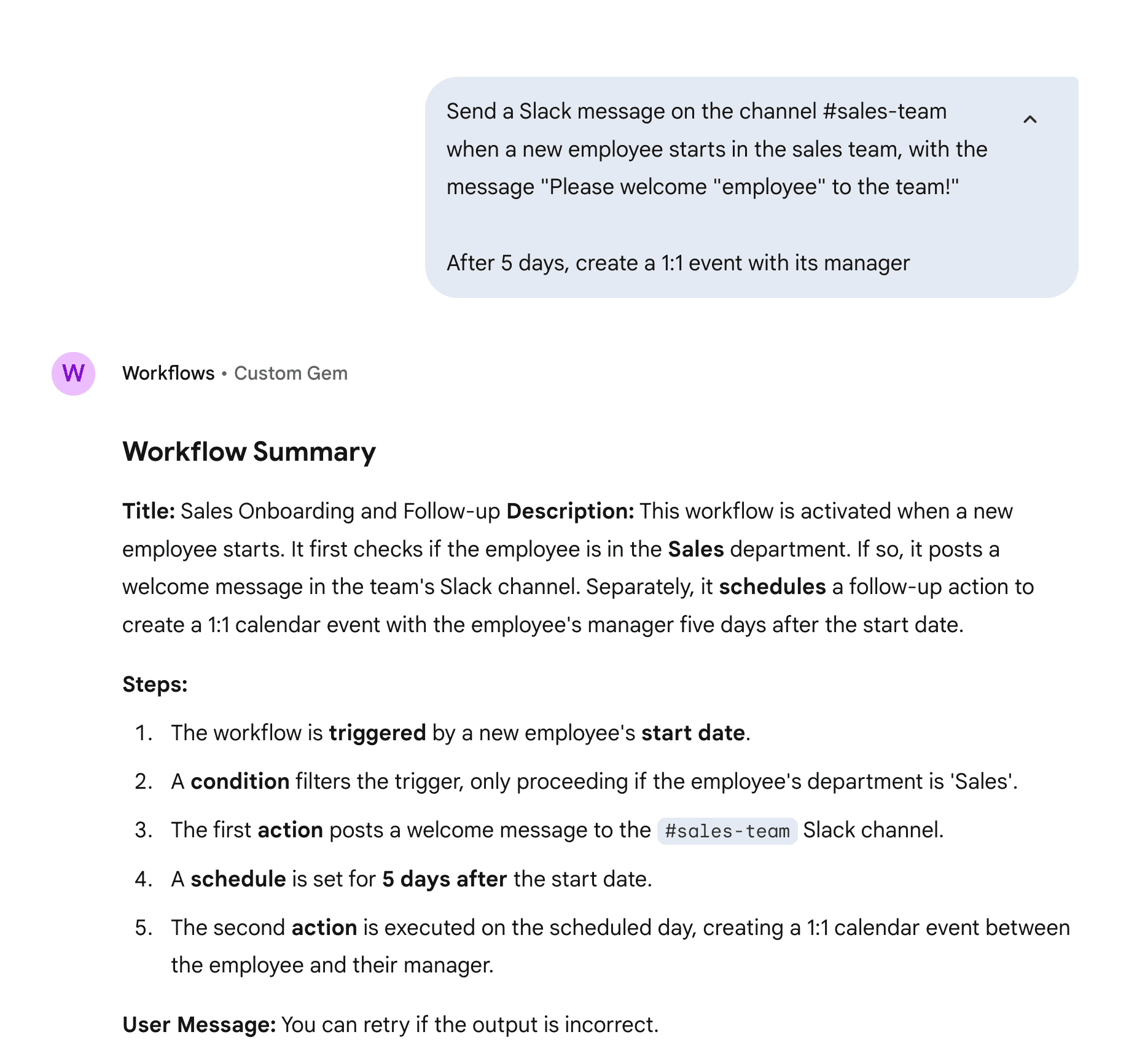
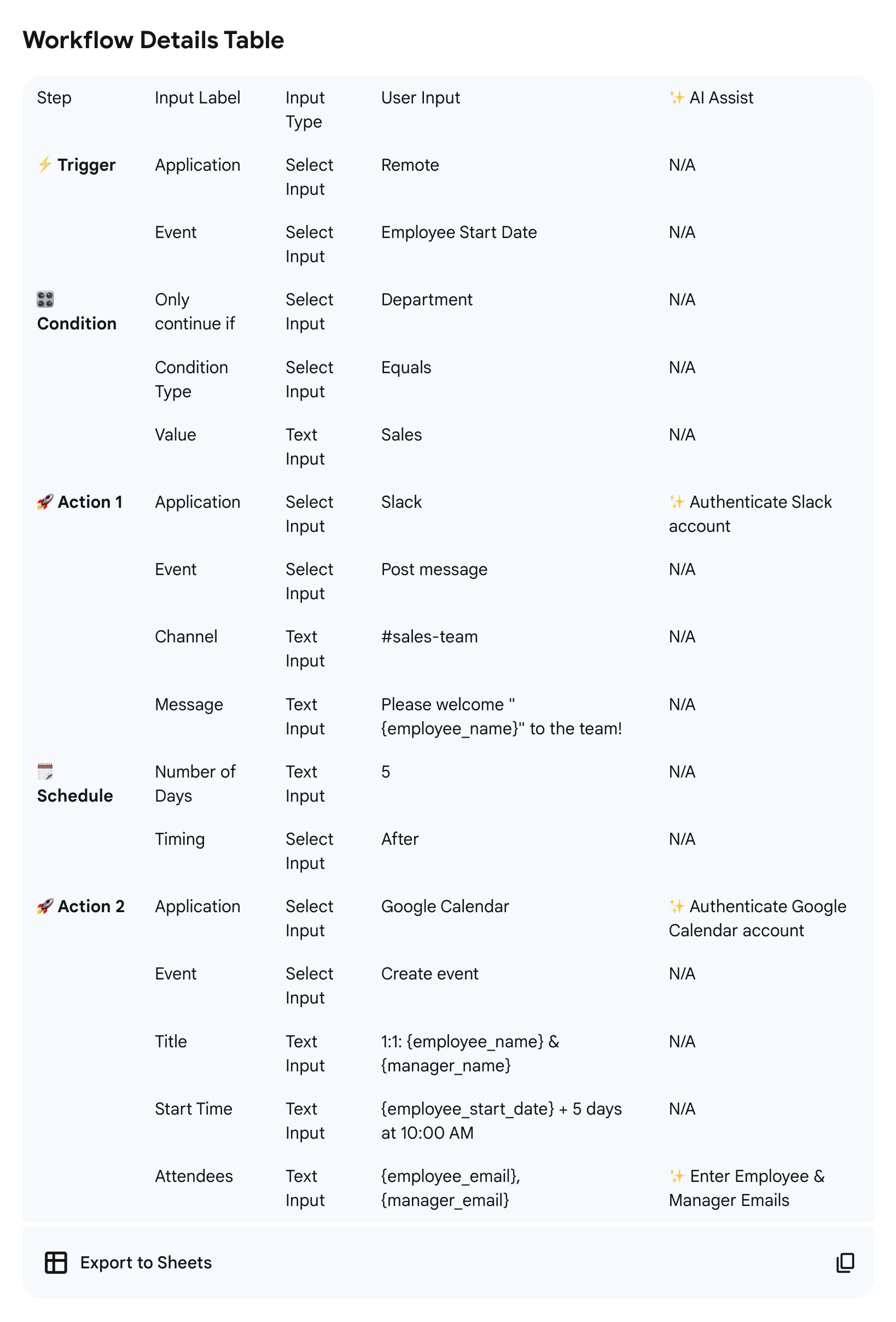
Two Goals, One Prototype

  • Tested the architecture with real complexity (validated in days via AI, not weeks of manual testing)

  • Early validation with internal users showed AI could handle sophisticated workflows

  • Gave engineers exact requirements for the manual builder implementation

  • Became reference documentation for the team

Two Goals, One Prototype

  • Tested the architecture with real complexity (validated in days via AI, not weeks of manual testing)

  • Early validation with internal users showed AI could handle sophisticated workflows

  • Gave engineers exact requirements for the manual builder implementation

  • Became reference documentation for the team

From Single Use Case to 10+ Triggers in 90 Days

From Single Use Case to 10+ Triggers in 90 Days

Single use case shipped to all customers:

"Post Slack message when team member requests time off"

Strategy

Ship narrow, learn fast, expand based on real usage.
Available to all Remote customers across HRIS, EOR, Contractors, and Global Payroll products.

"We have 39 workflows in Rippling. We'd love to move them to Remote if you support our use cases."

Very Good Ventures

Key Decisions That Shaped the Product

Key Decisions That Shaped the Product

Decision

What It Means

Solution

Why/Impact

Result

MVP Scope

MVP Scope

Customer feedback: existing tools were "too complex" and "overwhelming"

PM, engineering, and design agreed: Launch with single trigger → single action only. No multi-step workflows.

Bet on simplicity over power for v1. Reduce time to launch and validate approach first. Trade-off: Couldn't support sophisticated use cases initially.

Reduced time to launch by ~6 weeks. Validated demand before building complexity. Team added multi-step workflows in September 2024.

Smart Fields System

Smart Fields System

Users typing {employee_name} manually was error-prone. Data changes broke workflows.

Searchable menu of available fields.
User selects {employee_name} → auto-populates at runtime.

Created abstraction layer:
• Database: employment_contract_type: 'eor_contractor'
• User sees: "Employment Type: Contractor"

Hid database complexity while maintaining data accuracy. Users never needed to know field names.

Archive vs Delete

Archive vs Delete

Initial design had "Delete" button. Engineering flagged: deleting workflows breaks data warehouse metrics.

Changed to "Archive" button with separate "Archived" tab.

Data model constraint shaped UX. Users could still remove workflows from main view without breaking analytics.

Learning: Always validate data model constraints before finalizing UI patterns. This wasn't a UX decision—it was a database constraint.

API-Driven State Design

API-Driven State Design

How to handle asynchronous operations (Slack channel fetching, OAuth flows) without making users wait or showing incorrect data?

Used Postman to test actual API behavior and map real response states. Designed UI for each state: pending → loading, success → populated dropdown, error → reconnect button. Edge case: New channels not in cache → added "Refresh" + manual ID fallback.

Prevented designing "ideal" states that didn't match technical reality. Engineers confirmed approach was implementable before high-fidelity designs.

Zero post-launch bugs related to integration states. UI matched actual system behavior from day one.

MVP Scope

Customer feedback: existing tools were "too complex" and "overwhelming"

PM, engineering, and design agreed: Launch with single trigger → single action only. No multi-step workflows.

Bet on simplicity over power for v1. Reduce time to launch and validate approach first. Trade-off: Couldn't support sophisticated use cases initially.

Reduced time to launch by ~6 weeks. Validated demand before building complexity. Team added multi-step workflows in September 2024.

Archive vs Delete

Initial design had "Delete" button. Engineering flagged: deleting workflows breaks data warehouse metrics.

Changed to "Archive" button with separate "Archived" tab.

Data model constraint shaped UX. Users could still remove workflows from main view without breaking analytics.

Learning: Always validate data model constraints before finalizing UI patterns. This wasn't a UX decision—it was a database constraint.

Smart Fields System

Users typing {employee_name} manually was error-prone. Data changes broke workflows.

Searchable menu of available fields.
User selects {employee_name} → auto-populates at runtime.

Created abstraction layer:
• Database: employment_contract_type: 'eor_contractor'
• User sees: "Employment Type: Contractor"

Hid database complexity while maintaining data accuracy. Users never needed to know field names.

API-Driven State Design

How to handle asynchronous operations (Slack channel fetching, OAuth flows) without making users wait or showing incorrect data?

Used Postman to test actual API behavior and map real response states. Designed UI for each state: pending → loading, success → populated dropdown, error → reconnect button. Edge case: New channels not in cache → added "Refresh" + manual ID fallback.

Prevented designing "ideal" states that didn't match technical reality. Engineers confirmed approach was implementable before high-fidelity designs.

Zero post-launch bugs related to integration states. UI matched actual system behavior from day one.

90 Days of Rapid Expansion

90 Days of Rapid Expansion

August: Smart fields for dynamic content

September: Email action launched

Result: Expanded to 10+ trigger types, 15+ action types

By the time I left Remote in November 2024, the feature had grown from 1 use case to 10+ trigger types and 15+ action types in just 3 months—following the expansion plan and demonstrating the foundation's ability to support rapid growth.
What We Learned From Real Use

What We Learned From Real Use

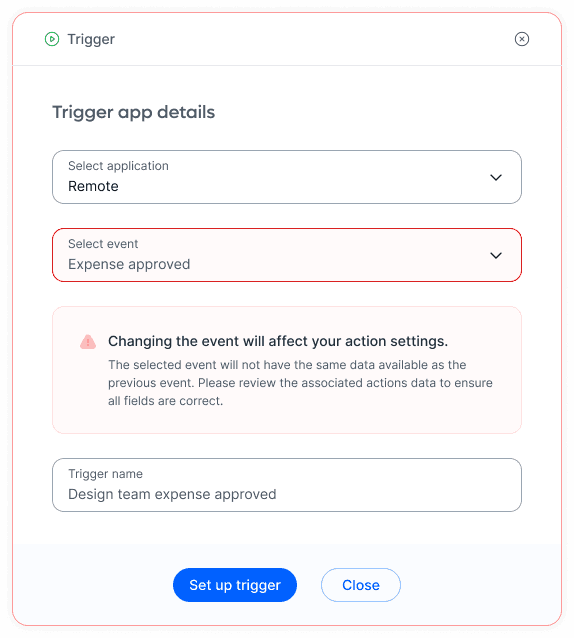
Trigger Change Cascade

When users changed the trigger event (e.g., Start Date → End Date), existing conditions became invalid. Needed confirmation modal: "Changing this will delete your conditions. Continue?"
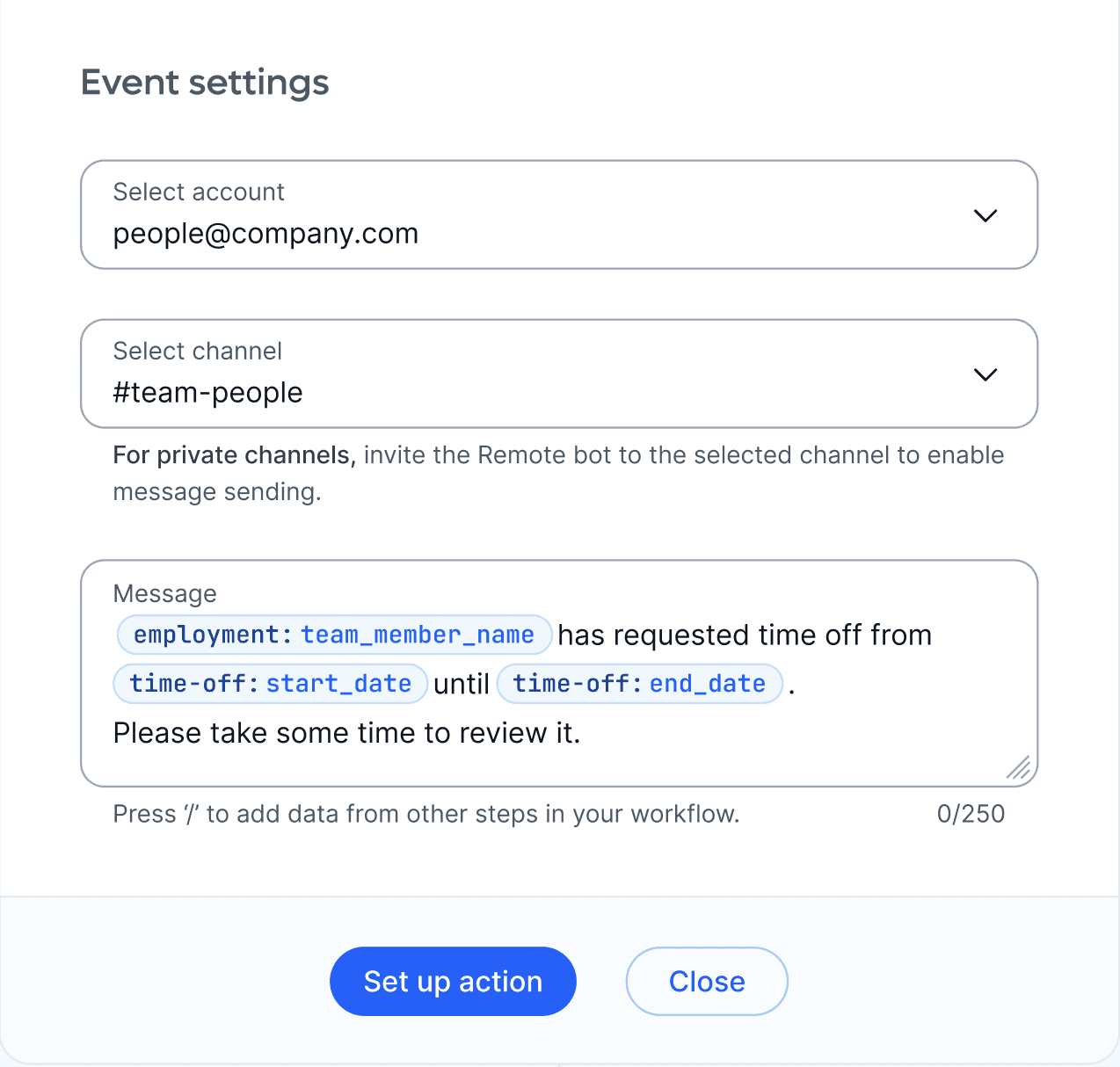
Private Channels Issue

Private channels didn't appear in the dropdown—Slack API only returned public channels by default. Added manual channel ID input as fallback.

New Channel Cache Issue

Newly created Slack channels took time to sync. Users couldn't find channels they'd just created. Added "Refresh channels" button to force re-fetch.

Dynamic Field Confusion

Early feedback: "Why does it say 'Email' in the action? Whose email?" Users didn't understand {email} referred to the triggered employee. Added contextual labels: "{employee_email}" made it obvious.

Three Principles That Stuck

Three Principles That Stuck

Data model constraints shape design

Archive vs Delete wasn't a UX decision—it was a database constraint. Always check technical feasibility early.

API-first design prevents post-launch bugs

Testing APIs in Postman before designing UI states saved engineering iterations. Design what's technically possible, not what's theoretically ideal.

Edge cases emerge from usage, not specs

Slack private channels, cache delays, field naming confusion—all discovered through real use. API testing caught some, user feedback caught others.